One CEO.
Zero jump-rope skills.
Put yourself in someone else’s viral jump-rope routine with one photo, one TikTok, and your AI agent. Then hand the same brief to a second model and let them fight it out.
The runner-up cost $0 MiniMax H3 onSogni Unlimited See the shootout
Our CEO, Mauvis, found a TikTok of a performer clowning through a double-dutch routine on a theater stage: two rope turners, a packed room, flawless comic timing. Mauvis watched it several times. No jump rope was purchased.
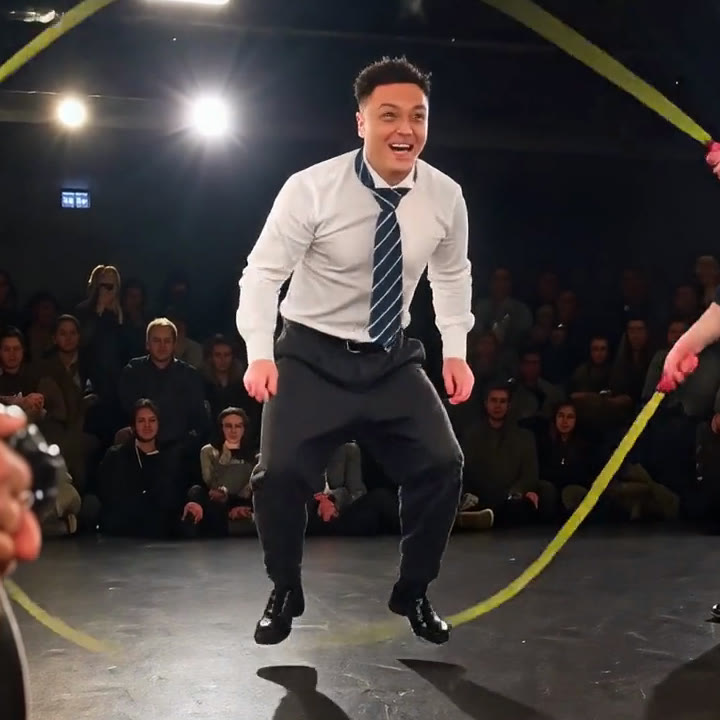
Claude Code got opened instead. It got one photo, the TikTok, and one run-on sentence. About half an hour of rendering later, the performer on stage was Mauvis, in a shirt and tie, hopping through the same ropes to the same soundtrack.
Then we got curious. With an agent doing the work, trying a second model costs one more sentence, so we ran the exact same job on MiniMax H3 to see which one would win.
This guide shows you how to do both. It assumes you already use Claude Code or Codex on your computer. You only need one of them.
What is the skill? The Sogni Creative Agent skill gives your agent the instructions and tools to generate images, video, and music through Sogni. You describe what you want in ordinary language. Your agent does the technical work.
Original performance: @jeanphilbonjour on TikTok. Go watch the real thing. It is better than ours, and the rope-jumping is real.
One message to get started.
Open Claude Code or Codex and paste this into the conversation:
Setup and install sogni.ai/skill
Let your agent walk you through installation and connecting your Sogni account. If it asks for a Sogni API key, you can find it in the account menu at dashboard.sogni.ai.
Already installed? Ask your agent to update to the latest Sogni Creative Agent skill first. That is literally how we started. New models and fixes land often.
For the Wan 3 version, add some Premium Spark, Sogni’s paid generation credits. Wan 3 uses them even if you have Unlimited. The MiniMax H3 version later in this guide is covered by Unlimited. Your Claude Code or Codex usage is billed separately.
One face. One TikTok.
Make a folder for the project and open it in your agent. Put two things inside:
- me.jpg
- tiktok.mp4
Use a clear, front-facing photo where your face fills a good part of the frame. This is the exact photo we used:

Save the TikTok to your computer with the app’s own save option, or ask your agent to help. Ours ran 34 seconds: 30 seconds of performance, then TikTok’s end card.
Tell your agent what to make.
Here is what Mauvis actually typed, unedited:
“Update to the latest Sogni Creative Agent skill and then use this video in here (the TikTok video I’ve inserted) as an R2V video, using Sogni Creative Agent skill plus Wan3, to make a video of me being replaced with this guy who is jump roping. I want the output video to be a video I can post to TikTok. Overlay the original sounds onto the new video if needed.”
R2V means reference-to-video: the model makes a new video guided by your references instead of editing the original.
That really was enough. For a more predictable first try, copy this fuller brief and change the filenames and outfit:
Use the Sogni Creative Agent skill and Wan 3 reference-to-video to put me into tiktok.mp4.

me.jpg is me. Replace the person jumping rope with me. Keep my face and hair from the photo, and dress me in the shirt and tie from my photo instead of the performer's costume.

Keep the stage, the rope turners, the camera movement, and the routine and timing as close to the video as possible. Split the performance into 15-second halves and render each one with the same photo, prompt, and seed. Drop the platform's end card, and keep the platform watermark out of what the model sees, so it does not paint someone else's handle into my video.

Put the original sound back on the finished video and upscale it to 1080 × 1920 for TikTok. Show me the estimated cost first. Then show me the original and my version playing side by side.
Then go get a coffee. Here is everything the agent handled for us without being asked:
- Updated the skill and its command-line tool
- Found the TikTok end card and cut it off
- Split the routine into two 15-second halves
- Kept the corner watermark out of what the model saw
- Rendered the first half as a test before paying for the second
- Checked the face and the join at full size
- Put the original soundtrack back, in sync to the frame
- Upscaled to 1080 × 1920 and packed it for TikTok
Same routine. New jumper.
Tap either video to play both together. Flip view puts them in the same spot. The original is the 480 × 854 TikTok download; ours is 1080 × 1920. Both use the original sound.
Watch it with the sound on.
Open the side-by-side comparison your agent makes and play it through. Reference-to-video makes a new performance guided by your references. It does not edit the original, so check it like a new take:
- Does the jumper read as you, especially when facing the camera?
- Does the outfit stay the same from start to finish?
- Is the join between the two halves smooth? Ours is at 15 seconds.
- Do the stomps and landings still line up with the soundtrack?
- Anything odd in the corners?
Two things we found in ours. At the 15-second join, the arm pose shifts slightly. And the model faithfully recreated the soft blur where the watermark used to be, as a faint smudge in the bottom-right corner. On TikTok, that corner sits under the like and share buttons, so we let it go.
If something bugs you, tell the agent exactly where. For example: “At 22 seconds, my tie turns into a scarf. Redo the second half.” Redoing one half only costs that half.
Wan 3 took about 14 minutes per half for us. We ran them one after another, testing the first half before paying for the second. Upscaling to 1080p took about 15 more minutes.
Same brief. Different model. Different jumper.
Here is the underrated trick: once your agent has done the job once, trying another model is one sentence. It reuses the same photo, the same 15-second halves, the same seed, and the same finishing steps. It even rewrites the brief into the new model’s preferred prompt format. MiniMax H3 wants a structured six-part prompt with the routine written out move by move. We didn’t write any of that.
Now make the same video with MiniMax H3 Standard reference-to-video. Use the same photo, halves, seed, sound, and upscale so I can compare the two versions side by side.
We asked for it just to see whether H3 was capable. It was more capable than we expected.
Wan 3 vs MiniMax H3, frame for frame.
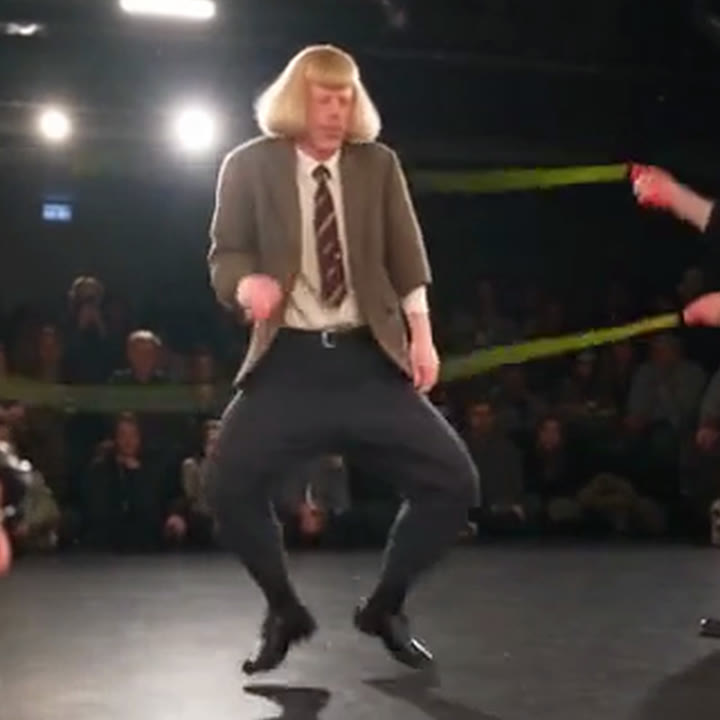
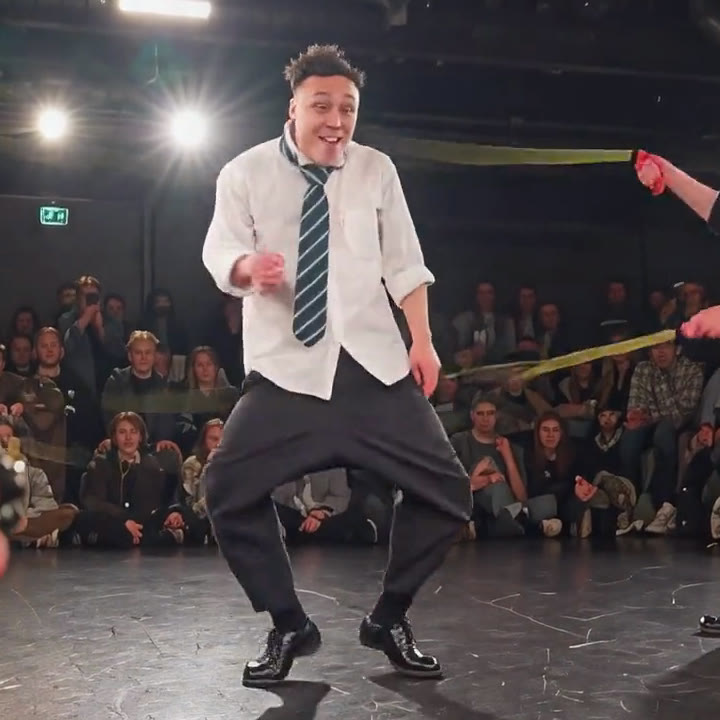
Both are 1080 × 1920 with the same original sound. Wan 3 renders at 30 fps and H3 at 24 fps. Watch the second half: that’s where they split.
| Wan 3 | MiniMax H3 Standard | |
|---|---|---|
| Follows the routine | Beat for beat, all 30 seconds | Beat for beat for 15 seconds, then starts freelancing |
| Your face | Recognizable | Sharper, closer to the photo |
| The 15-second join | Small arm shift | Pose and framing jump a little |
| Time per half | About 14 minutes | About 23 minutes, including time queued behind other jobs on our account |
| Cost for 30 seconds | $7.02 on Unlimited Pro | $0 on Unlimited |
| Verdict | Clear winner | Impressive runner-up |
Wan 3 was the clear winner. It stayed locked to the performer’s timing for the whole routine, which is what makes the joke land.
But look how far H3 got. The first half is just as tight, your face comes out sharper, and on Sogni Unlimited it costs nothing. For quick drafts, or when you are iterating on an idea, a free model that gets this close is a very good deal. Save the paid run for the take you actually post.
One take per model, same seed, same inputs. Different clips will favor different models, and that is the point: with an agent, a comparison is cheap enough to run every time.
About seven dollars. Or zero.
Wan 3 bills both the seconds it watches and the seconds it makes. Each half is 15 seconds of reference video plus 15 seconds of output, so 30 billable seconds at $0.13 each.
Two 15-second Wan 3 reference-to-video renders · one photo reference plus 15 seconds of reference video each · 720p · 9:16 · 30 fps · Unlimited Pro’s 10% discount.
| Your Sogni plan | Wan 3 | MiniMax H3 Standard |
|---|---|---|
| Pay as you go | $7.80 | ≈ $4.81 |
| Unlimited | $7.41 (5% off) | $0 · included under fair use |
| Unlimited Pro | $7.02 (10% off) | $0 · included under fair use |
Wan 3 is a third-party model paid with Premium Spark, even on Unlimited, where members get 5% off and Pro members get 10% off. MiniMax H3 runs on Sogni’s own network, so Unlimited covers it under fair use. Without a subscription, H3 reference-to-video bills about $0.08 for each output second and each second of reference video.
The 1080p upscale uses Sogni’s FlashVSR, which is also included with Unlimited under fair use.
Checked September 27, 2026, PT, with the Sogni Creative Agent CLI’s live estimates and our account’s actual charge. Retries, subscriptions, agent usage, and taxes are extra. Ask your agent for a fresh quote before rendering.
Ready for your For You page.
The finished file is 1080 × 1920, H.264 with AAC sound, about 60 MB. That is exactly the shape TikTok wants. Before you post:
- Turn on TikTok’s AI-generated content label. This video is AI-generated; say so.
- Credit the original creator in your caption. The routine, the stage, and the soundtrack are theirs.
- Keep the original sound as-is, so viewers can find the source.
Your turn on stage.
Pick a routine you could never do. Find one good photo. Give your agent the brief, then make the models compete. No stretching required.
Copy the setup message ↑Explore Wan 3 on Sogni → Explore MiniMax H3 →Sources and the full generation prompts
- Original performance by @jeanphilbonjour on TikTok. The example on this page is an AI recreation and does not show Mauvis actually jumping rope.
- Sogni Creative Agent skill, installation and usage.
- Wan 3 model guide, reference limits and member discounts.
- MiniMax H3 model guide, reference-to-video and Unlimited coverage.
- FlashVSR upscaler, coverage and output sizes.
- The exact prompts the agent sent: Wan 3 (both halves), MiniMax H3 first half, and MiniMax H3 second half. The brief in this tutorial is a simplified way to ask for the same workflow.