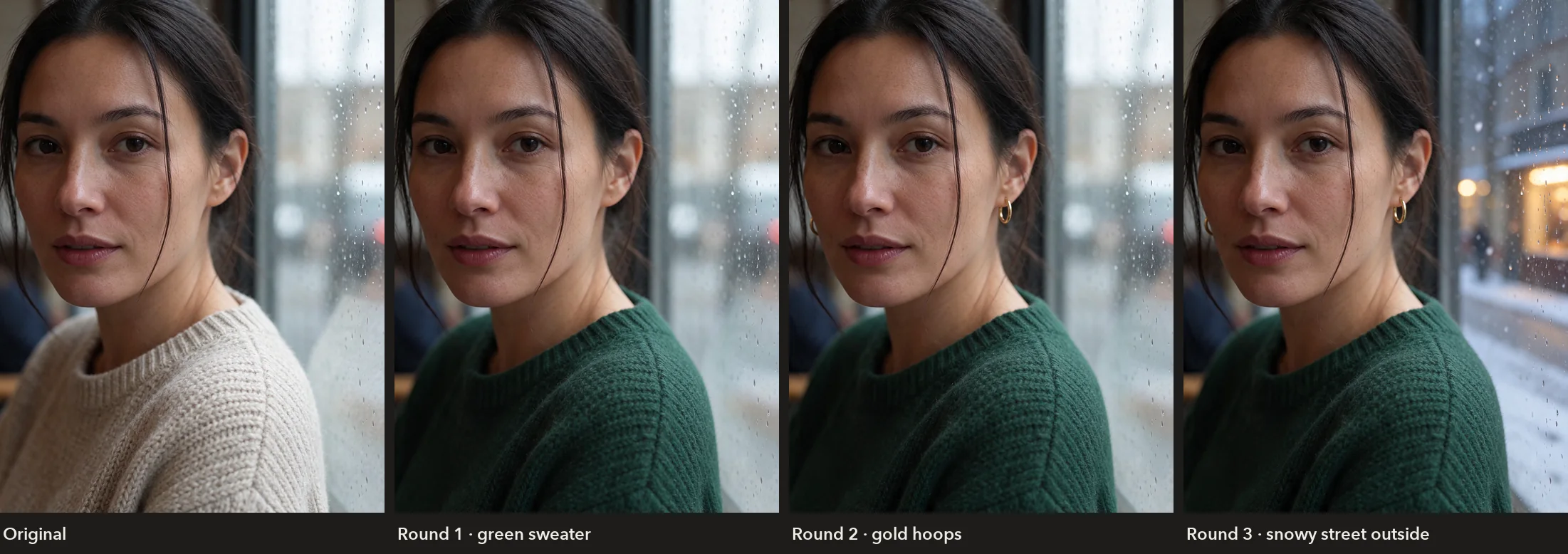
Edit in rounds
You can keep editing a result, one change at a time. We changed this portrait three times: a green sweater, then gold hoop earrings, then a snowy street outside the window. Her face and the rest of the picture stayed the same from round to round.
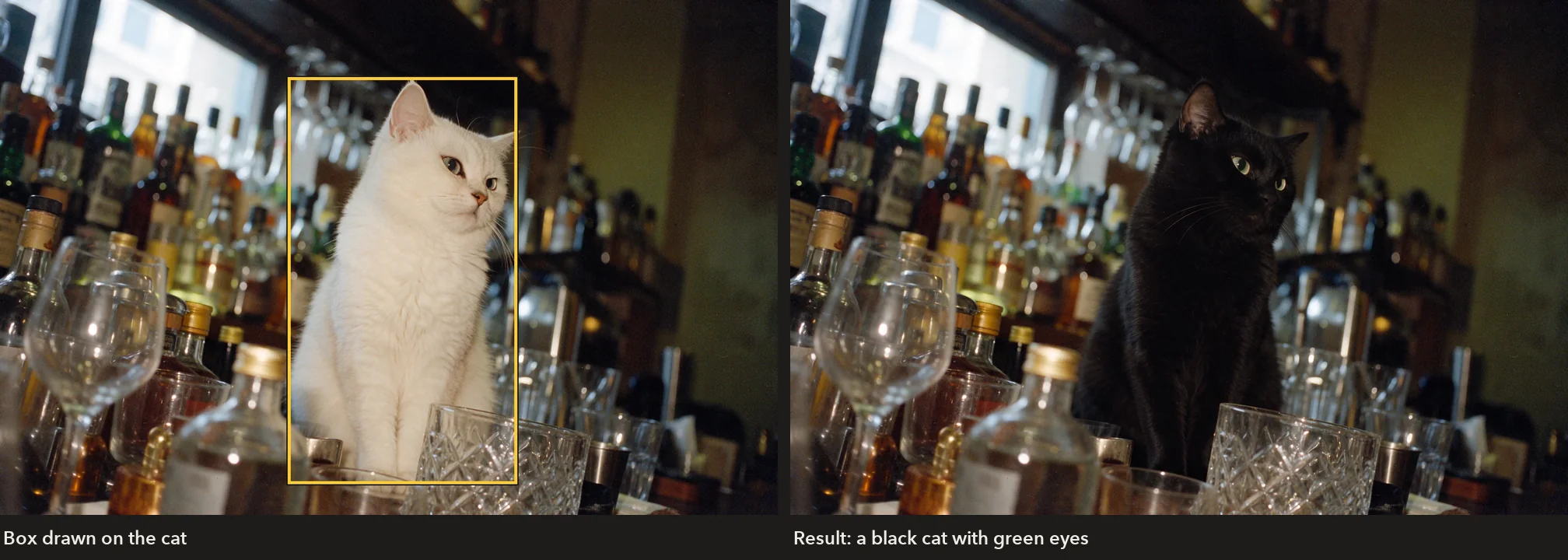
To change one thing in a busy picture, use Point or box edit. Draw a box around it, or click a point, and describe the change. A box around the white cat turned it into a black cat with green eyes, and the bottles, the glasses and the light stayed as they were.
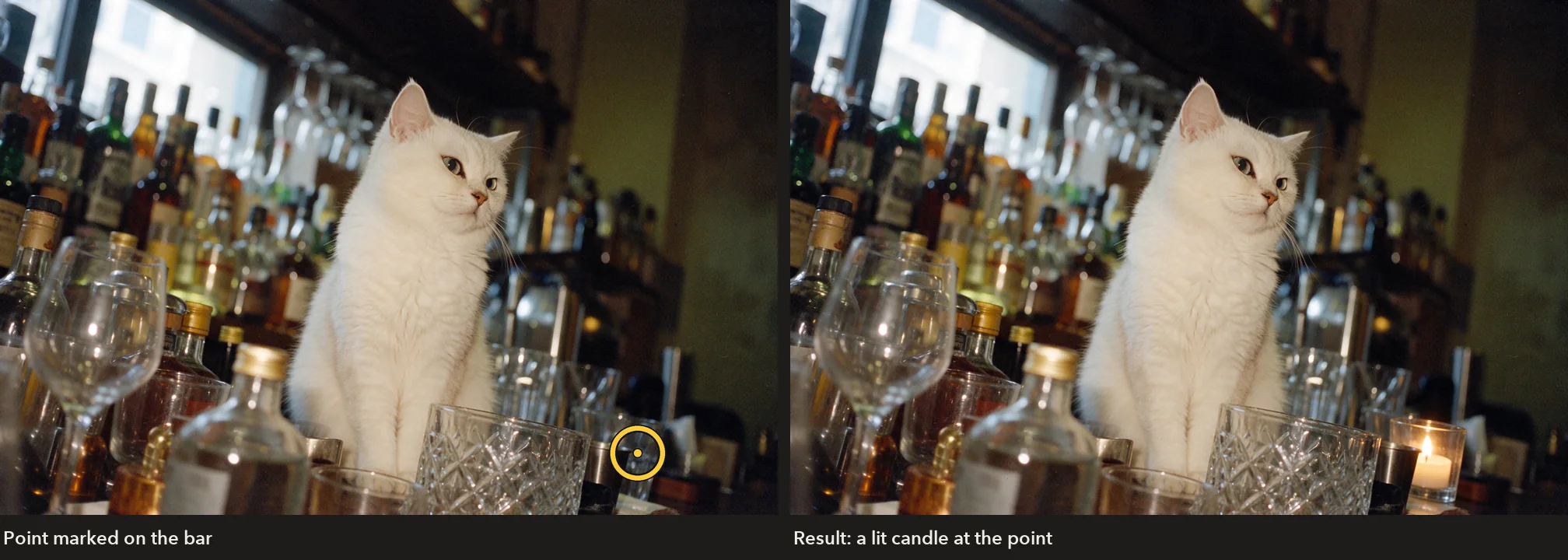
A point works the same way. Clicked on the bar, it became the spot for a small lit candle in a glass holder.
Transparent backgrounds
Ask for a sticker, a logo, a product shot or a character, turn on a transparent background, and Seedream 5.5 returns the picture with nothing behind it, as a PNG or WebP ready to drop onto a design. There is nothing to cut out afterwards. It works from a prompt alone, and from reference images too; your references don't need transparency of their own.
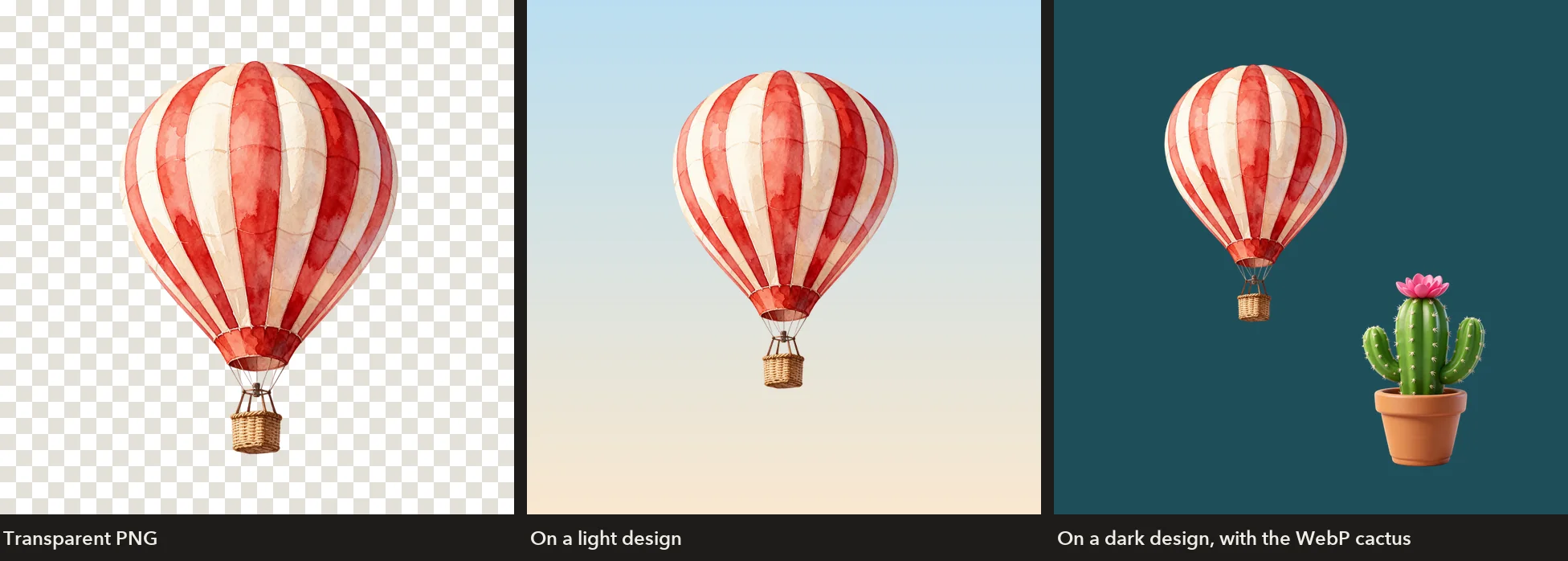
Prompt · 1536 × 1536 · PNG
A hand-painted watercolour hot-air balloon with red and cream stripes and a small wicker basket, isolated with nothing behind it.
Describe the subject on its own, as in "isolated with nothing behind it", so the model knows what to keep.
Split an image into layers
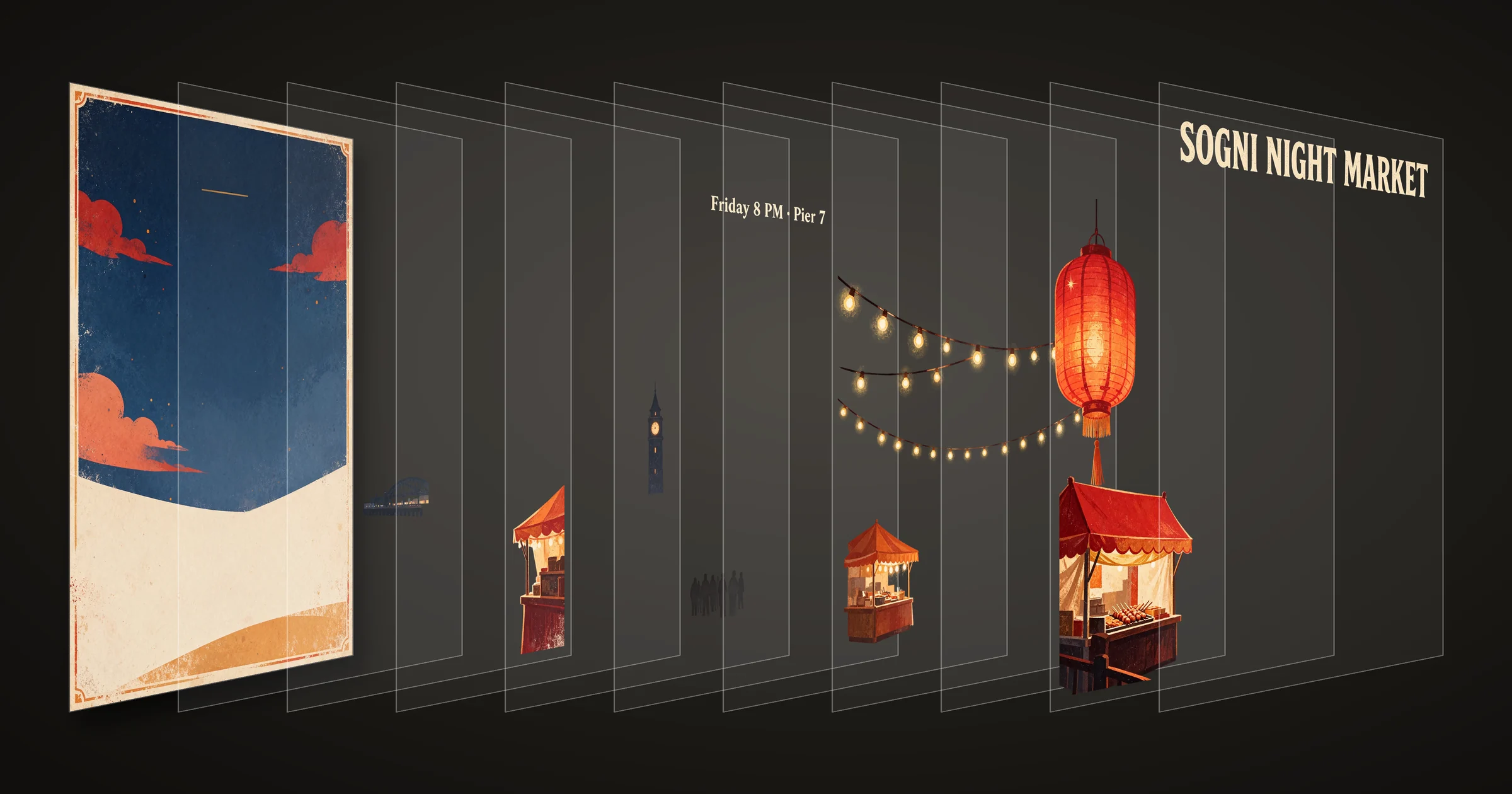
Layer extraction takes one finished image and pulls it apart. You get the base image plus each element on its own transparent PNG layer. Every layer arrives with a name, a short description and the box it occupies on the base, so you can move it, recolor it, swap it for something else or rebuild the layout in your design tool. Download a single layer or all of them.
We made a night-market poster with Seedream 5.5 and split it at 2K with no prompt. It came back as a base image of empty sky and ground, and ten layers named by the model:
- Off-white bold retro main title text
- Off-white retro subtitle text
- Hanging orange-red Chinese paper lantern
- Diagonally hung warm yellow string lights
- Left red wavy roof market stall
- Middle orange wavy roof market stall
- Right orange-red wavy roof market stall
- Dark pedestrian silhouettes in market path
- Right dark clock tower building
- Distant arched iron bridge and lit waterfront buildings
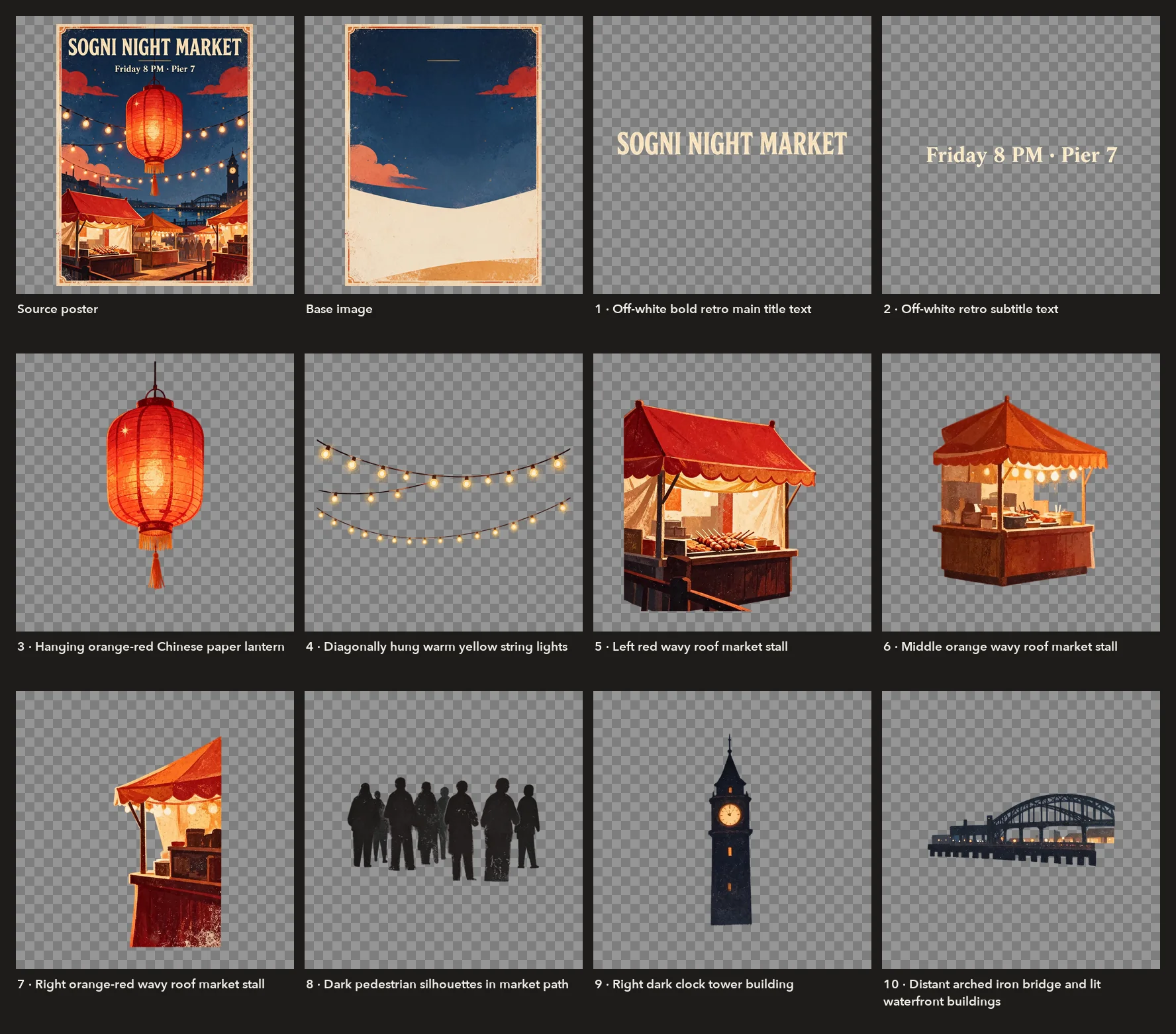
Leave the prompt empty and the model decides what to separate, or name what you want, such as "the headline, the lantern and the background". You choose the resolution, 1K, 1.5K or 2K, and the most layers to return, up to 99. The model returns as many as it finds, up to your limit: with a prompt naming every object and room for 99, the same poster came back in 33 layers. Each layer is rendered close to the chosen resolution, so small parts come back with plenty of pixels: the subtitle covers 990 × 348 pixels of the poster, and its layer arrived at 3452 × 1215.
Turn on text recognition, and when the model recognizes a layer as plain printed text, it reads that text back with its font, color and style. Both lines of this split came back that way, “SOGNI NIGHT MARKET” and “Friday 8 PM · Pier 7”, each with the closest matching font and its color. The prompted 33-layer split of the same poster returned no text, and decorative lettering and handwriting stay as pictures.
Skin, light and texture
Seedream 5.5 renders people with natural skin and believable light. This 1776 × 2368 portrait keeps visible pores, fine freckles and loose strands of hair at full size.
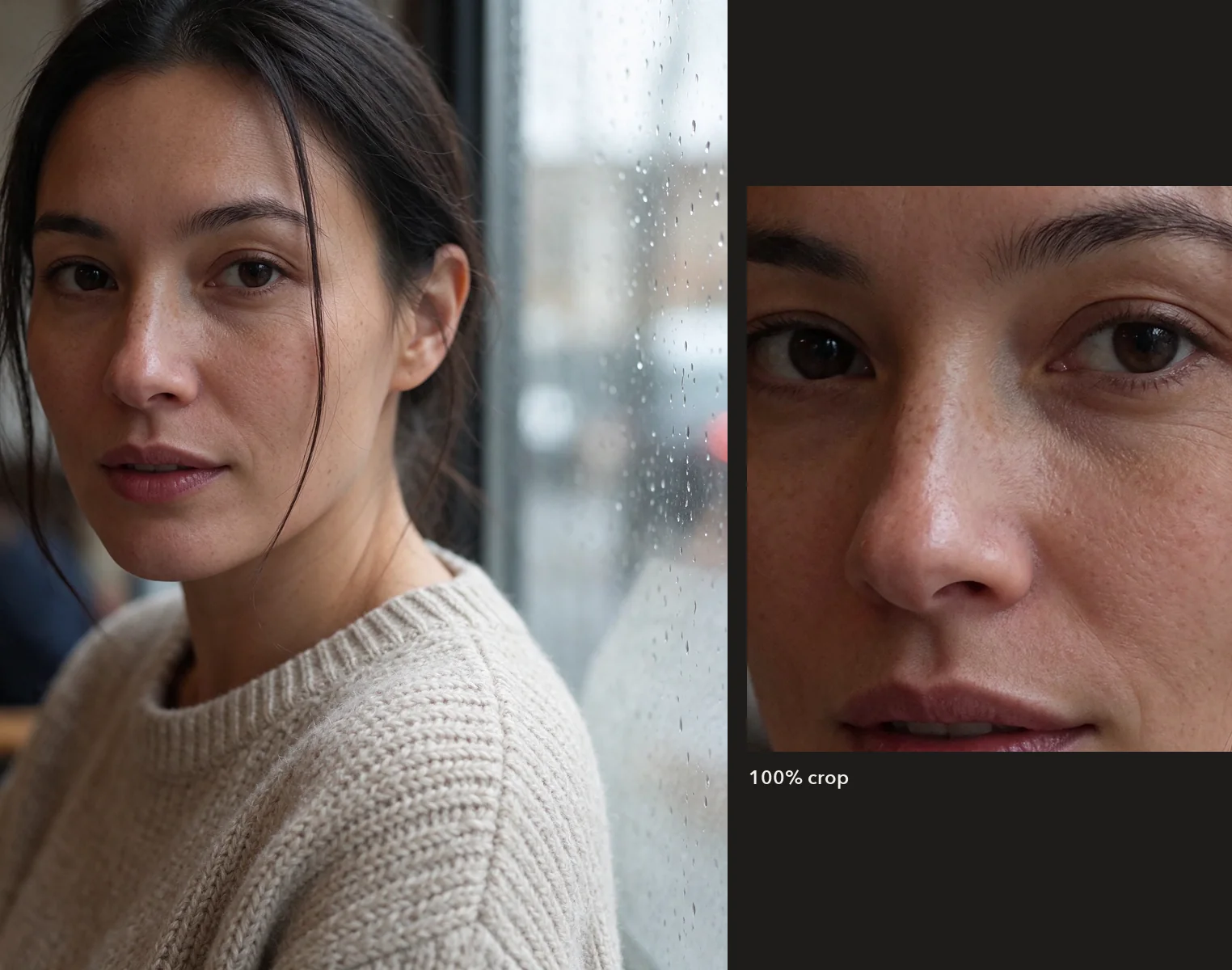
Prompt · 1776 × 2368 · PNG
A candid close-up portrait of a woman in her late thirties sitting by a rain-streaked cafe window in soft overcast daylight. Natural skin with visible pores, fine freckles and faint laugh lines, no makeup gloss, a few loose strands of dark hair across her cheek, a chunky oatmeal knit sweater. Shallow depth of field, 85mm lens, true-to-life colour.
Small text in more than one language
Put the words you want in quotes, say where they go, and say there should be no other text. On this serum bottle every line came out as written, in three scripts: English, Japanese (保湿美容液) and Chinese (日常屏障精华), down to “Niacinamide 5% · Ceramide NP” and “30 ml / 1.0 fl oz” in the small print. The poster above carries exactly its two lines for the same reason.
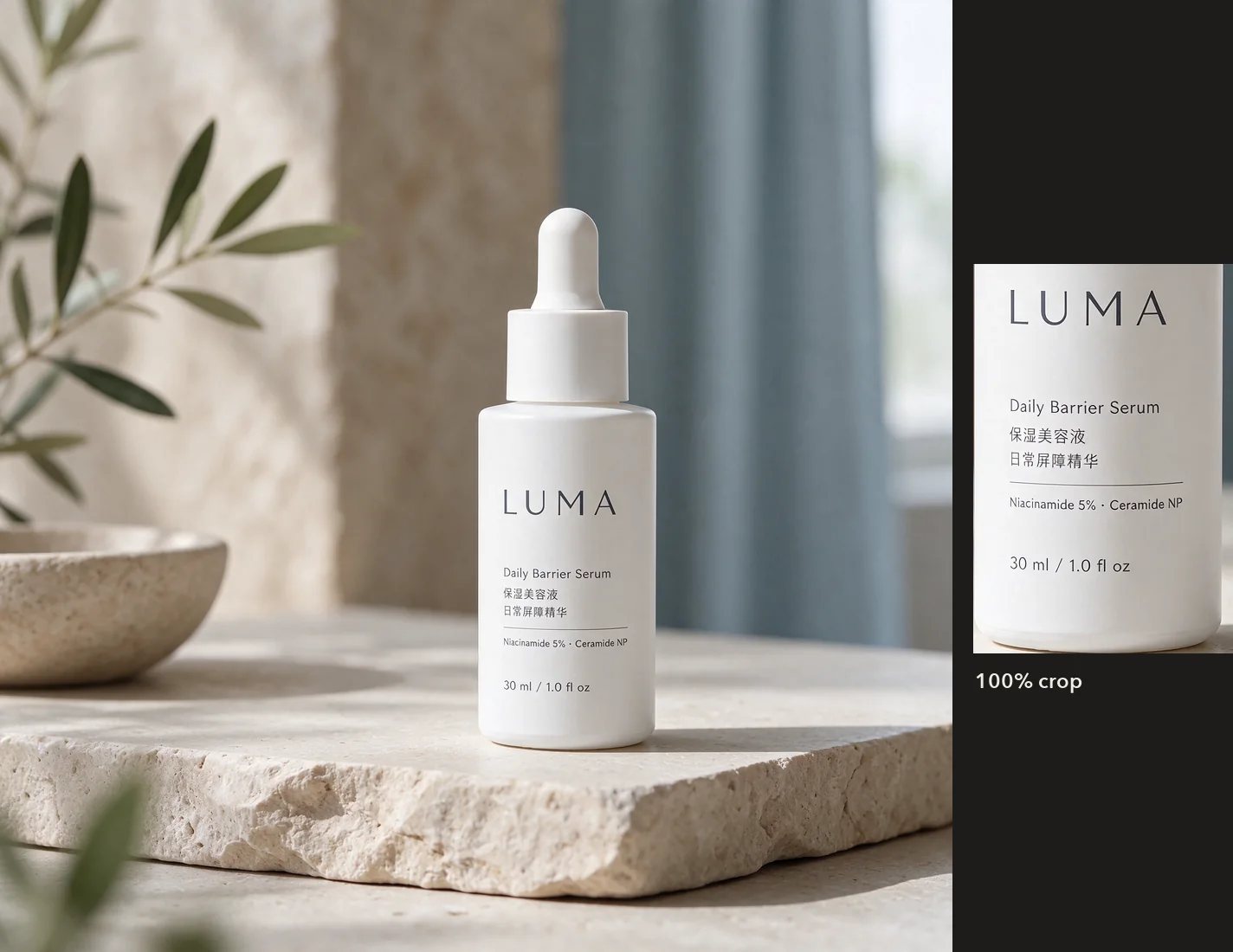
Prompt · 1536 × 1536 · PNG
A product photograph of a matte white skincare bottle on a pale stone shelf. The label is printed in crisp small type: the brand name 'LUMA' in large letters, then the lines 'Daily Barrier Serum', '保湿美容液', '日常屏障精华', 'Niacinamide 5% · Ceramide NP', and '30 ml / 1.0 fl oz' at the bottom. Soft window light from the left, gentle shadow.
Blend up to 10 references
Attach up to 10 images and say what each one is for. Seedream 5.5 combines objects and a scene into one picture and matches its light. Here the watercolor balloon (Image 1) and the potted cactus (Image 2) joined the dawn lake (Image 3), with the mist, the soft light and the balloon's reflection in the water.
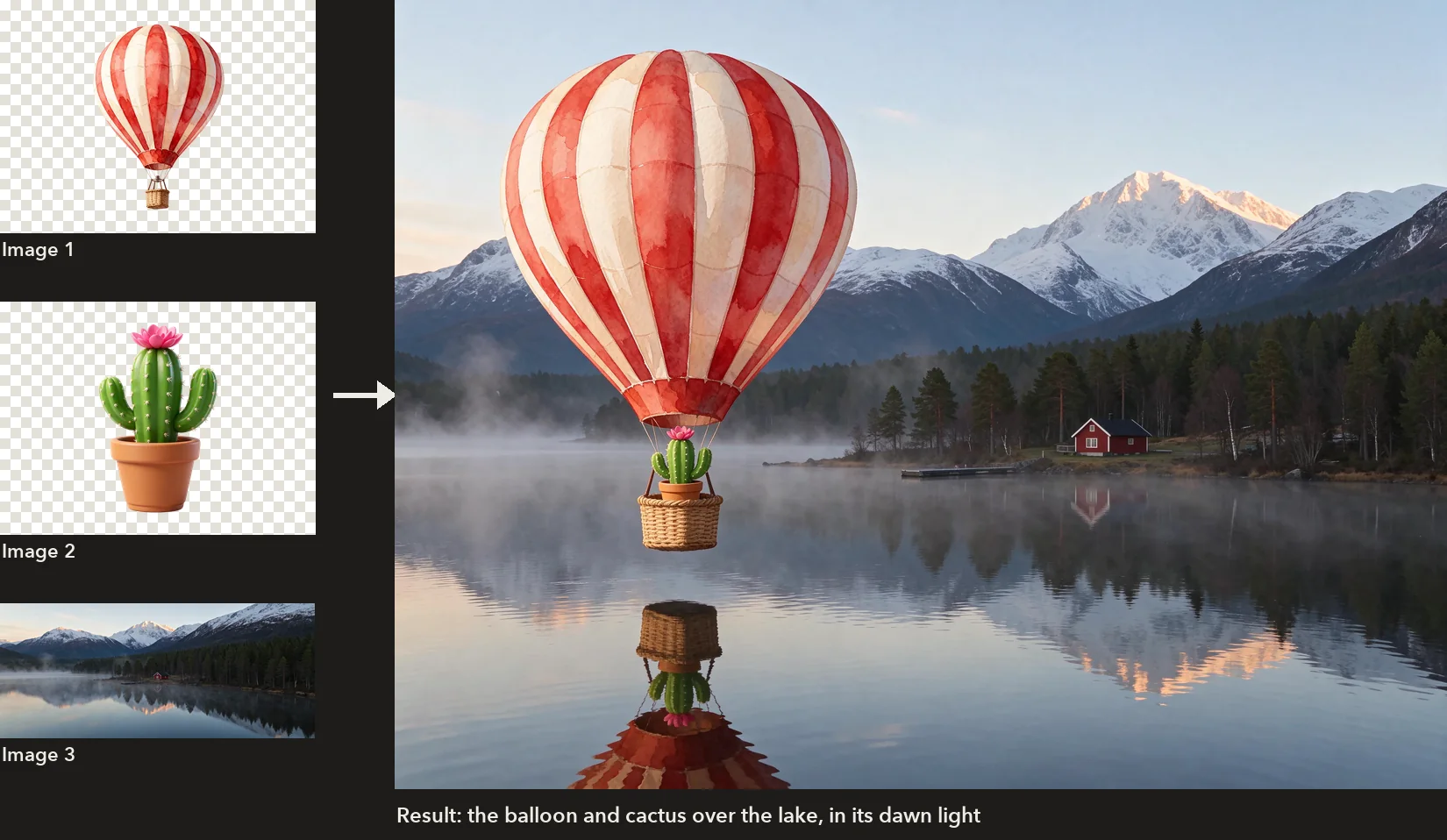
Prompt · 2368 × 1776 · 3 references
The striped watercolour hot-air balloon from Image 1 floats low over the lake from Image 3 at dawn, with the potted cactus from Image 2 sitting in its wicker basket. Match the soft dawn light, mist and reflections of Image 3, and keep the balloon and the cactus looking exactly as in their images.
Bigger images
Seedream 5.5 renders up to the 2K tier, about 4.6 megapixels: 2048 × 2048 square, 2816 × 1584 for 16:9, 1584 × 2816 for vertical covers and 3136 × 1344 for 21:9 banners. Through the SDK, any size from about 0.9 to 4.6 megapixels works, at any shape from 1:16 to 16:1.
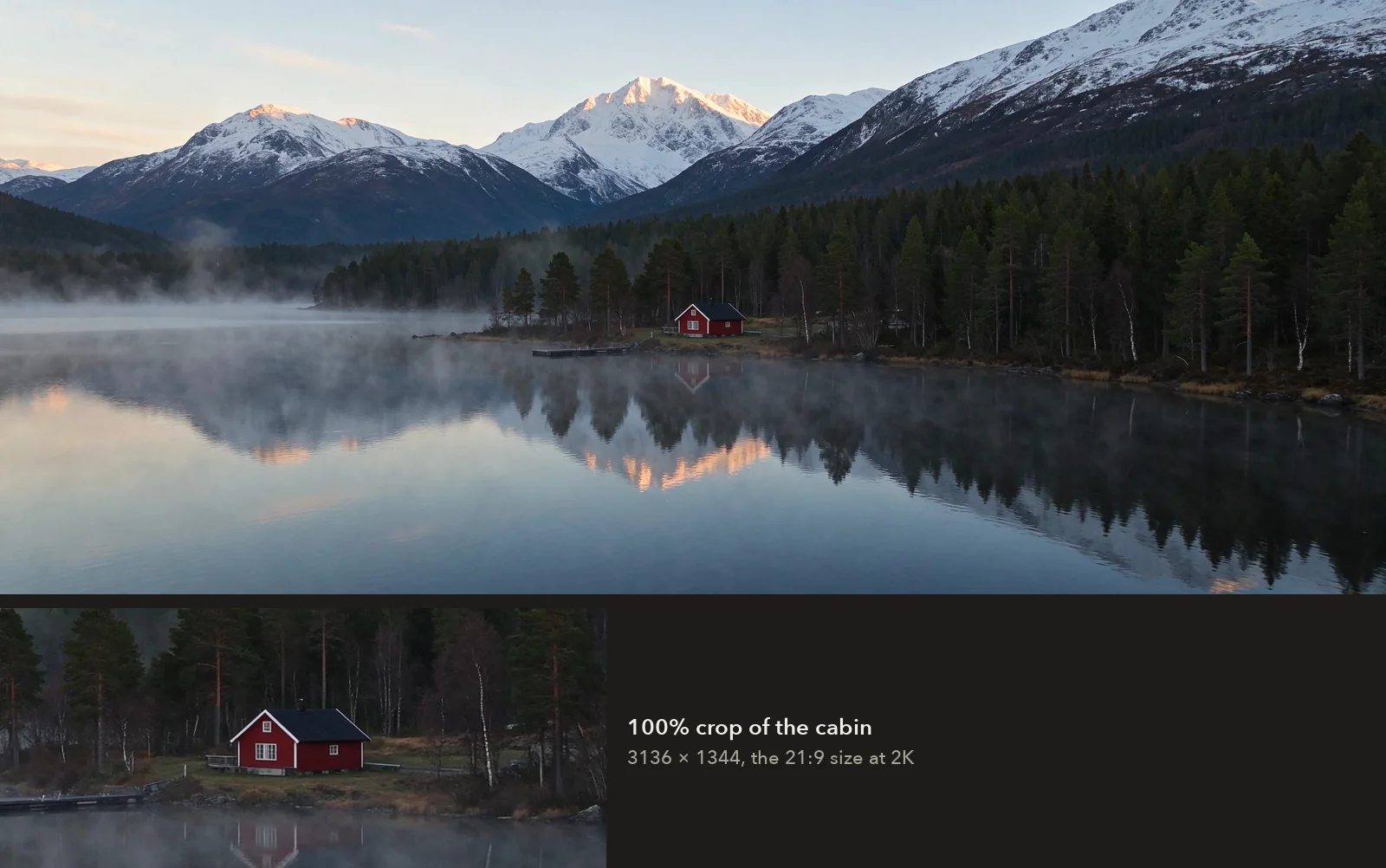
Prompt · 3136 × 1344 · PNG
A wide cinematic landscape at dawn: a lone red cabin beside a glassy mountain lake, mist lifting off the water, snow-capped peaks catching first light, a pine forest along the shore.
Try it in Sogni Create
- At app.sogni.ai, open your username menu, switch off the Sensitive Content Filter under Content preferences, and confirm you are 18 or older.
- In the image model picker, choose Seedream Uncensored. It opens to Seedream 5.5, and Seedream 5.0 Pro is there too.
- Accept the one-time likeness and consent agreement before your first image. If you already accepted it for Seedance or Seedream 5.0 Pro, you're set.
- Write a prompt, or add reference images under Context. For a cut-out, turn on Transparent Background. For layers, add one image, turn on Split into layers, and choose the Layer resolution and Max layers; turn on Recognize text to get the words back from text layers.
Use your own likeness, or that of people who gave you explicit, legal consent.
In the SDK
Use the model ID seedream-5-5-uncensored. A transparent cut-out:
const project = await sogni.projects.create({
  type: 'image', network: 'fast', tokenType: 'spark',
  modelId: 'seedream-5-5-uncensored',
  positivePrompt: 'A hand-painted watercolor hot-air balloon with red and cream stripes, isolated with nothing behind it',
  width: 1536, height: 1536, numberOfMedia: 1,
  outputFormat: 'png',
  seedreamBackground: 'transparent'
});
const [balloonUrl] = await project.waitForCompletion();
And a poster split into layers:
const split = await sogni.projects.create({
  type: 'image', network: 'fast', tokenType: 'spark',
  modelId: 'seedream-5-5-uncensored',
  contextImages: [poster], numberOfMedia: 1,
  positivePrompt: 'Separate the headline, the lantern, the stalls and the sky',
  seedreamLayerDecomposition: true,
  seedreamLayerSize: '2K',
  seedreamLayerMaxImages: 17,
  seedreamLayerTextRecognition: true
});
await split.waitForCompletion();
const job = split.jobs[0];
for (const layer of job.layers ?? []) {
  console.log(layer.zIndex, layer.name, layer.boundingBox.absolute, layer.textRecognition?.text);
}
job.resultUrl is the base image, and job.getLayerUrl(zIndex) returns a fresh link to any layer. Accept the agreement once in the Sogni app with the same account, and SDK jobs run after that. The model guide lists every option.
What it costs
| Seedream 5.5 Uncensored | Spark | USD |
|---|---|---|
| Image up to about 2.6 megapixels, every 1K and 1.5K size | 6 | $0.03 |
| Image up to about 4.6 megapixels, the 2K sizes | 10.5 | $0.0525 |
| Each reference image | 2.4 | $0.012 |
| The poster split above: a base and ten layers at 2K | 117.9 | $0.5895 |
It uses Premium Spark on every plan. Unlimited members save 5% and Unlimited Pro members 10%. A layer split is priced per returned image plus the source image. Sogni Create shows the most it can cost for the layers you allow, and you pay for what comes back.
Start creating
Seedream 5.0 Pro Uncensored stays available beside 5.5, under the same agreement.